

Contact your direct seller to get the admin account. Default IMEi as user name login
1. Whether the SIM card balance is insufficient.
2. Whether the device moved outdoor for GPS signal
3. Send SMS command "server#" to device SIM card number to check if default IP Port parameters are correct. Or configure IP Port again .Refer to the user manual.
1. Insert SIM card with SMS and data services.
2. Power on the device.
3. Device will automatically recognize SIM card APN and connect to the Secumoreplus server.
4. If automatic APN setup fails, manually configure APN via SMS command(Refer to the user manual for details)
1. Whether the SIM card balance is insufficient.
2. SMS command format is incorrect. Follow the correct user manual
3. SIM card does not support SMS.
4. SIM card restrictions by the operator.
5. Whether the device in deep power-saving mode, switch to vibrate mode or real time mode.
Yes, our trackers support the mainstream third-party platforms, such as Wialon, Traccar, GPSWOX, Flespi, Fulltime, etc. Or you can consult the platform service provider to see if it supports our device protocol.
The IMEI number has not been imported into the platform, please provide your IMEI to your purchasing dealer or send an email to us to solve it.
Tracking platform:
www.cantrackportal.com
login user: 888
Password:123456
Download IOS & Android APP, search name ”SecumorePlus“ from playstore or Appstore.
we can offer you admin account for manage unlimited tracking target.
Cantrack trackers are fully integrated into the GPS-Trace platform, expanding the capabilities for Cantrack device users.
GPS-Trace is a unique platform offering software solutions for GPS tracking and fleet management (B2B) as well as personal tracking (B2C) of vehicles, assets, and pets.
All GPS-Trace applications support Cantrack trackers in both mobile and web versions. The platform features include White Label options, API integration, and Stripe/PayPal payment tool.
GPS-Trace platform is easy to use and is known for its applications:
· Forguard (applications for distribution by partners and construction business in the field of GPS tracking;
· Ruhavik (app for tracking private vehicles and property);
· Petovik (for tracking pets).
Step-by-step instructions for connecting Cantrack tracker to GPS-Trace
Step 1: Create an account
Create an account in the GPS-Trace system using the web version of the platform or one of the mobile applications for personal use. After creating an account, do not forget to confirm your email address using the link from the letter that will be sent to you after registration.
Step 2: Creating an Unit
· Click on the + icon
· Select device type
· Enter your tracker ID
· Click on the “Save” button.
Step 3: Tracker configuration Using SMS Commands 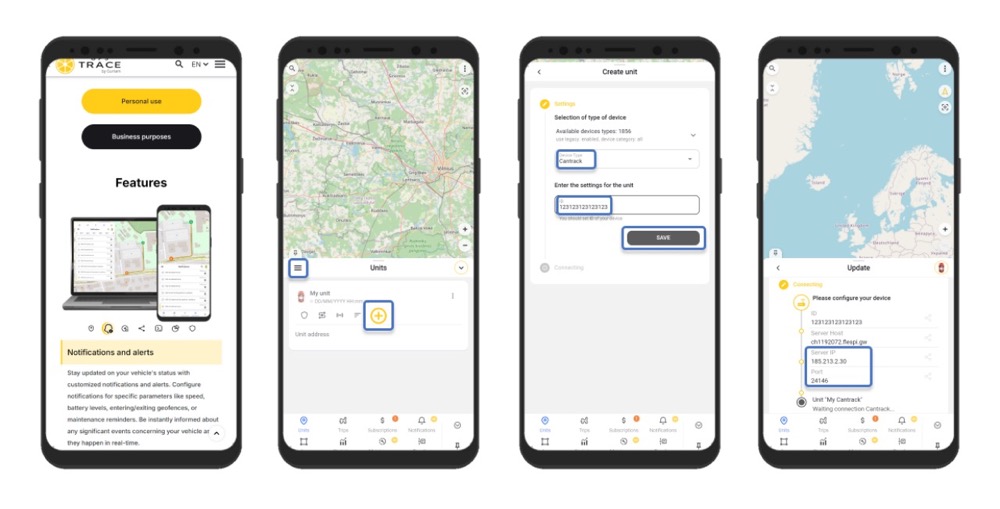
��All commands are sent to the SIM card number inserted in the tracker, the default password is 123456, do not enter "+" "space", these are for a better understanding of the command.
1. Initially, set up the central number.
SMS command:
centernum123456+space+phone number
2. Configure the APN according to the requirements of the SIM card provider used in the tracker.
SMS command:
apn123456+space+localApn+space+ApnName+space+ApnPassword
3. Direct your tracker on the server and port specified when creating the unit. Later, this information can be seen in the unit settings in the "Hardware" section.
SMS command:
adminip123456+space+IP+space+port
4. Set the time zone.
SMS command:
timezone123456+space+(timezone*60)
⚡For operation on the GPS-Trace platform, the tracker must be set to the timezone 0 (UTC).
For example, to set the 0 timezone enter the command timezone123456 0
After completing the setup, your tracker will start sending data to the GPS-Trace platform, and you will be able to monitor the movements of the unit in real time. Take advantage of all the platform's features for effective management of your fleets and assets.
GPS-Trace apps allow you to:
1. Track the location of your vehicle, car, bike or scooter in real time.
2. Build tracks and view events.
3. Create geofences.
4. Receive notifications about the state of the unit and events occurring with it (including entry/exit from a geofence).
5. Send GPRS commands to the tracker.
6. Share your tracker's location with other people.
7. Receive statistics on your facility and track the need for transport maintenance activities.
8. See all the tracker messages it sends and store your travel history.
Q: How to examine parameters of my trackers, or how to know if my IP Port is correct?
Send check sms as below:
Tk100: TCP
TK08A: check123456
C32: ip#
You could find out the actual IP/Port of current device.
Below are the commands to set IP/Port to Cantrack default platform/APP:
Secumore1 APP:
G05/TK08A: adminip123456 www.gps228.com 8989
TK100: #ip#123456#www.gps228.com#8989#
C32: server,1,www.gps228.com,8989,0#
Secumoreplus APP:
G05/TK08A: adminip123456 www.gps2828.com 7018
TK100: #ip#123456#www.gps2828.com#7018#
C32: server,1,www.gps2828.com,7018,0#
We have two web platforms:
Old platform: www.gps228.com, www.secumore1818.com, APP: Secumore1
New platform: www.gps2828.com, www.cantrackportal.com APP: SecumorePlus
Old platform is out of maintenence anymore, won't add any new function or bug fixing.
All new purchased devices shall be added on new platform.
Also new products released in 2021 & 2022 will only support new platform, including C32, G06L, G07L, G08L, G09L, G200NY, P60L & more.
We encourage all old platform users switch to new platform accordingly. If you need to create new admin account on new platform, welcome to contact our sales.
alger.qin@6gpstracker.com
 Phone: +8619874120903
 Tel: +86 755 2370 2092
 Skype: castel.alger
 Whatsapp: +8619874120903
 Add: FL5, BLDG B, Lianxing Industrial Park, JiangJun Rd, Qiuchang, HuiYang District, Huizhou, Guangdong, China
Copyright © Huizhou Cantrack Technology Co., Ltd. All Rights Reserved. Sitemap “仲达荣”商标为惠州市仲达荣科技有限公司所有


PRODUCT

ABOUT
SUPPORT
NEWS
CONTACT US
 Language


 EN
EN

